Browser Extension
We have a handy browser extension: InStijl.AI Lightspeed Toolbar. This toolbar is a great tool for every webshop owner. It allows you to easily navigate from a product page in your storefront to the product page in the backoffice. Additionally, through this extension, we bring a number of AI functionalities to your Lightspeed backoffice!
Installing on Google Chrome
Use the Chrome Webstore to install the extension: https://chromewebstore.google.com/detail/instijlai-lightspeed-tool/epnicndkjbmfoodomdldgfgcfnfedkbm?hl=en
Installing on Microsoft Edge or other Chromium browsers
You can also use the Chrome Webstore for these browsers to install the extension: https://chromewebstore.google.com/detail/instijlai-lightspeed-tool/epnicndkjbmfoodomdldgfgcfnfedkbm?hl=en
Installing on Mozilla Firefox
Install the Firefox Addon from this link: https://addons.mozilla.org/en-US/firefox/addon/instijl-ai-lightspeed-toolbar/
Linking the extension to InStijl.AI
Follow these steps to link your InStijl.AI account to your browser extension.
- Log in to your InStijl.AI account.
- Go to your account settings. (Click on your name in the bottom left > Settings)
- Go to the 'Chrome extension'/'Browser extension tab.
- You can generate a 'Pairing code' here. Give your pairing code a name, such as 'Work laptop'. This way you know exactly which pairing code is being used on which device.
- Click on Generate pairing code.
- You will now see a pairing code. Please note: you will only be able to see this once.
- Copy the pairing code.
- Open the Extension settings in your browser and paste the pairing code in the designated place:
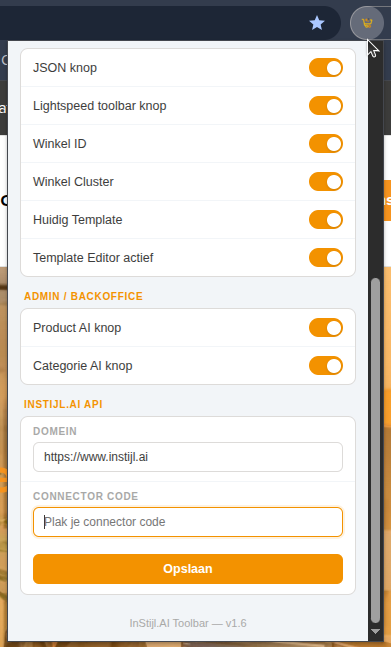
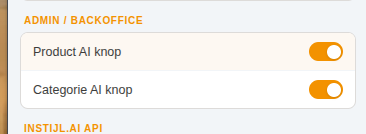
- Ensure that all checkboxes for AI buttons are checked.

- Save the settings.
You can now immediately use all AI tools within your backoffice! 🎉